AI TOOL / #08846
Copy for Chat GPT
An extension used to copy ChatGPT responses and check for plagiarism.
Introduction
Extension to copy ChatGPT responses and check for plagiarism.
What is the Plagiarism Detector Extension for Chrome – an extension/plug-in for Google Chrome?
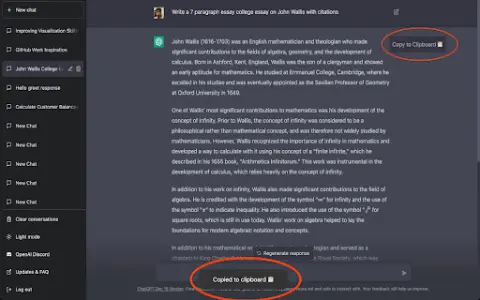
This extension allows you to copy the responses generated by ChatGPT by clicking a button or using the CMD+K shortcut key, and then have those responses checked by plagiarism detection tools.
How to use the Plagiarism Detector Extension for Chrome?
You can use this extension by clicking the copy button on ChatGPT’s response or by pressing CMD+K. The copied text will be automatically checked to determine whether it contains any plagiarized content.
The core functionality of the Plagiarism Detector Extension for Chrome.
One-click to copy the response from ChatGPT
Use the CMD+K shortcut key to copy.
Automatic plagiarism detection
Related
GPT-EW
A ChatGPT-powered Chrome extension that brings AI-enhanced browsing and real-time assistance to any website.
EnhanceDocs
AI-powered document search engine offering natural language search and pre-built integrations.
GPTGuard
Enhances ChatGPT privacy and s...
Nexusbots AI
Nexusbots AI offers unlimited business automation services for a fixed monthly fee.
Punya AI
An intelligent AI platform that supports the customization of chatbots and offers services for data integration and brand protection.
Powerly.ai
Build a platform that enables code-free creation of custom ChatGPT instances and chatbots.