AI TOOL / #07222
ReadImage
Extract, edit, and copy text from images on web pages.
Introduction
Extracts, edits, and copies text from images on web pages.
What is Image Text Extractor ai chrome extension/plugin?
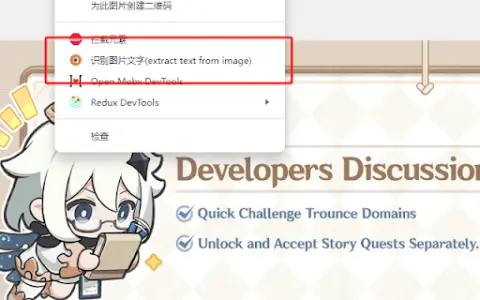
This extension allows users to extract text from images displayed on web pages. It supports common image formats such as jpg, jpeg, png and bmp. After extraction, the text can be edited and copied.
How to use Image Text Extractor ai chrome extension/plugin?
Hover your mouse over the image, right-click and select "Extract text from image". Press "Ctrl + Q" to view the extracted text on the extension page, where it can be edited and copied.
Image Text Extractor ai chrome extension/plugin core features
Extract text from images on web pages
Edit extracted text
Copy extracted text
Related
CopyFind – Plagiarism and AI Detector
Free tools for detecting plagiarism and AI-generated content.
Jindata AI Exam
AI-powered tool for quick exam...
ai-con.lawyer
An AI-driven NDA review service that provides risk analysis and suggestions for making necessary modifications.
Trace GPT AI Detector by PlagiarismCheck.org
A Chrome extension for detecting AI-generated text and ensuring the authenticity of online content.
GPT-3 Detector
A Chrome extension designed to detect text generated by GPT-3.
Unspam AI
Free email spam checking and delivery testing tools, equipped with AI-powered insights.