AI TOOL / #06738
Chat GPT Logger
An extension tool used to save ChatGPT conversations as local text files.
Introduction
Extension to save ChatGPT conversations to a local text file.
What is the GPT Chat Logger AI Chrome extension/plug-in?
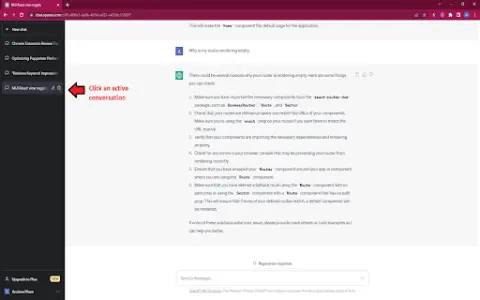
The GPT Chat Recorder is an extension that allows you to save active conversations from Chat GPT as text files on your computer. All you need to do is click on an ongoing conversation, then click the save icon, and finally save the file to your device. These steps are also illustrated in the image provided.
How to use the GPT Chat Logger AI Chrome extension/plug-in?
Click on an active conversation within ChatGPT, select the save icon, and then save the file to your computer.
The core functionality of the GPT Chat Logger AI Chrome extension/plug-in
Save the ChatGPT conversation as a local text file.
Related
FaceIQ Labs
Analyze over 100 facial indicators and monitor their changes over time.
Rerun
An AI “employee” that operates by being integrated with existing subscriptions.
BizPeel
Decoding the Revenue Generation and Growth Strategies of Real-World Startups
Huxly
Create a mobile app that can be immediately launched on the market after just one sentence is written.
Motionflare
Add a website address to create a brand promotion video.
threejs.org
The 3D rendering standards are essential for creating any type of 3D game. The examples available on the official website can be directly used and modified, but the downside is that these files tend to be quite large in size. Before using them in a small game, it’s necessary to trim them down; otherwise, the storage space will be completely occupied by these files.