AI TOOL / #06716
VoiceWave: ChatGPT Voice Control
Enhance ChatGPT's voice control, read-aloud functionality, and multilingual support.
Introduction
Enhances ChatGPT with voice control, read-aloud features, and multi-language support.
What is the ChatGPT Voice Control Extension AI Chrome extension/plugin?
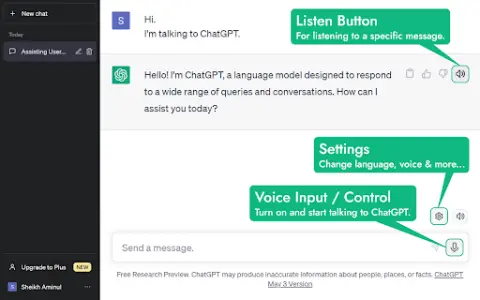
This extension enhances ChatGPT's voice control and read-aloud capabilities by leveraging advanced speech recognition and text-to-speech (TTS) technology. It allows users to have voice conversations with ChatGPT in multiple languages, enabling them to interact with the AI without typing. Users can easily send voice queries and listen to the AI's responses.
How do I use the ChatGPT Voice Control Extension AI Chrome extension/plugin?
Install the extension, enable the microphone, and start speaking. Access settings via the ️ icon to customize voice control language, speech rate, voice commands, and keyboard shortcuts. Click the ️ icon or press the spacebar to activate voice control. Click the icon to listen to messages or toggle read-aloud.
Core features of the ChatGPT Voice Control Extension AI Chrome extension/plugin
Multilingual voice control and input
Text-to-speech functionality for AI responses
Customizable voice and language settings
Adjustable speech rate
Customizable message sending options
Automatic language detection for TTS
Read-aloud feature with sentence highlighting
Customizable keyboard shortcuts
Real-time voice conversation
Related
Aisma
There’s no need to reshoot it; just modify the already-recorded video with one sentence.
Replay QA
QA who explores applications independently to identify bugs
SoreQen
An inference-based AI assistant with flexible weight settings
TestSprite
An independent testing agent designed to verify any changes made to the code.
Scenetra
Each time it is generated, the system automatically searches for the cheapest channel available.
FaceIQ Labs
Analyze over 100 facial indicators and monitor their changes over time.