AI TOOL / #06218
Talk with GPT Extensions
A Chrome extension for conversing with OpenAI's GPT-3 via voice or text.
Introduction
Chrome extension for conversing with OpenAIs GPT-3 using voice or text.
What is the Talk-with-GPT AI Chrome extension/plugin?
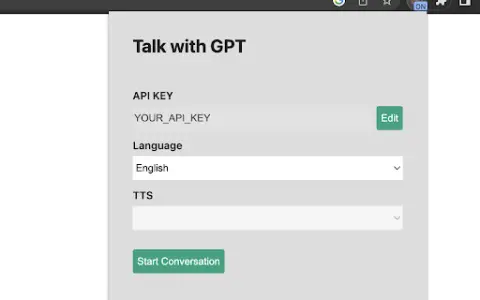
Chat with GPT is a Chrome extension that allows users to converse with OpenAI's latest language model AI. It enables a natural and engaging chat experience through voice or text input. The extension leverages Chrome's speech synthesis and text recognition features to provide a seamless conversational experience with the AI.
How do I use the Talk-with-GPT AI Chrome extension/plugin?
1. Get an OpenAI API key. 2. Open the extension popup. 3. Register the API key. 4. Select a language if needed. 5. Click the “Start Conversation” button. 6. In the pop-up window, click the “Click to Speak” button to start the conversation.
Core features of the Talk-with-GPT AI Chrome extension/plugin
Voice and text conversations with GPT-3
Using Chrome's speech synthesis and text recognition
A simple and intuitive user interface
Related
The new Doozy
The AI colleagues in Slack who actually get things done…
New Qiantu AI
The AI marketing design platform under Qiantu Network
New Stella
An emotional AI that listens to you and remembers every detail.
New LyricEdits
Upload a song to generate an AI-generated lyric video.
The new Starkomand
Simultaneous coordination of multiple programming agents on a Mac
New Jockey
TwelveLabs Video Asset Library Agent