AI TOOL / #06176
MeetGPT – ChatGPT for Google Meet
Free Chrome extension for Google Meet transcription and summarization.
Introduction
Free Chrome extension for Google Meet transcription and summarization.
What is the MeetGPT ai chrome extension/plugin?
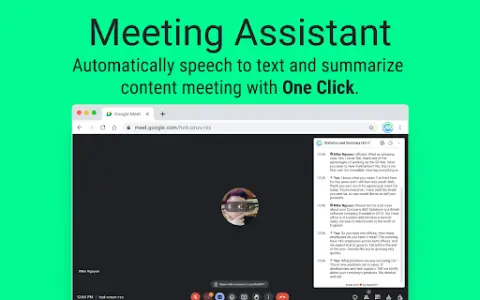
MeetGPT is a free Chrome extension designed to automatically transcribe and summarize meetings on Google Meet. It is designed to save users time and increase productivity by providing features such as automatic transcription, speaking time analysis, meeting history, multi-language support, ChatGPT-based summaries, task list generation, and upcoming meeting report sharing.
How to use MeetGPT ai chrome extension/plugin?
1. Log in to https://chat.openai.com.
2. Create a new meeting using https://meet.google.com and set the meeting language the first time.
3. After the meeting, view the meeting report charts and summary, and easily share the meeting with one click.
Core features of MeetGPT ai chrome extension/plugin
Automatically transcribe Google Meet content
Statistics of each participant’s speaking time
Meeting history
Supports 18 languages
Meeting summary using ChatGPT
Use ChatGPT to generate meeting task lists
Meeting report sharing (coming online soon)
Related
Zoom Earth
Recently, the weather in Zhengzhou has been absolutely unbearably hot. On the 16th, the maximum temperature reached 44 degrees Celsius! I’d like to share with you a map platform that allows you to observe the weather around the world. It’s called Zoom Earth. Zoom Earth is an interactive tool developed by Neave Interactive.
Image Toolbox
The Image Toolbox is an open-source, free, and versatile image-processing tool for Android devices. If you frequently need to edit images, this app is definitely one of the essential tools in your mobile device arsenal. It offers features such as pixel-level drawing, filters, batch processing, format conversion, and even AI-powered functions.
Universal small in-AI thesis expert
Universal Xiaoin is an AI creation assistant with 130 + AI applications. With just a title, you can quickly generate a literature review, issue report, PPT, work summary, and so on. Demonstrating that the tool calls itself a thesis artifact, I opened the membership to try it out and found that this tool is really something!, I asked him to help
CrxDL
As is well known, it is not possible to access the Google Chrome extension store normally in China. If you want to install extensions for your Chrome browser, you have to first download the corresponding.crx files locally before installing them. CrxDL is exactly a service that allows you to search for such extensions.
docsmall
docsmall is a completely free online image and PDF processing tool that supports image format conversion, image compression, GIF compression, PDF editing, and more. It also supports AI-powered image processing features, such as lossless image enlargement, automatic image cropping, and smart erasing. Below, I’ll share a few features I frequently use
Digital Litchi
Digital Litchi is a genuine software marketplace where you can purchase almost any commonly used software. The platform frequently offers discounts on genuine software, with the prices often being 40% to 60% lower than those available through official channels – which is definitely very cost-effective. For example…