AI TOOL / #04050
AI Roundtable
Ask a question and receive answers from multiple AI assistants.
Introduction
Ask one question, get answers from multiple AI assistants.
What is a Multiple AI Assistants Chrome extension/plug-in?
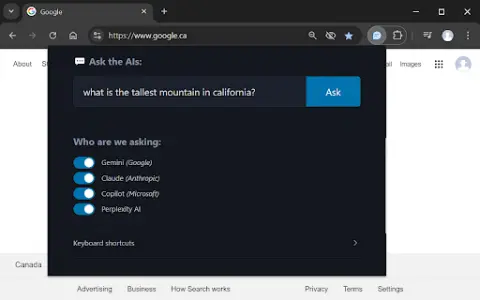
This website allows users to submit questions at once and receive answers from multiple AI assistants. Users can customize which assistant they want to use for their queries. The website also provides keyboard shortcuts, making it easy to access various functions quickly.
How to use the Multiple AI Assistants Chrome extension?
Use the shortcut keys Ctrl/Cmd + Shift + Q to open the query window and start typing your question. Use Alt + 1 to switch to Gemini, Alt + 2 to switch to Claude, Alt + 3 to switch to Copilot, and Alt + 4 to switch to ChatGPT.
The core functions of various AI Assistant extensions/plugins for Chrome.
Query multiple AI assistants simultaneously
It is possible to customize the selection of AI assistants.
Convenient and fast keyboard shortcuts
Related
Veyld – Anonymous messages with photos
An anonymous messaging app with AI filtering and photo-sharing features.
AI Content Detector – Copyleaks
Accurate AI content detection, even in the face of paraphrased or mixed-content scenarios.
RateMyTube
A platform designed to rate and comment on Sinhala-language YouTube content, in order to ensure its safety and reliability.
Fotify
Live photo sharing and RSVP management platform for unforgettable events.
iDox.ai
Provides organizations with AI-based document compliance and information masking solutions.
Ink To Ivy
An artificial intelligence-powered platform designed to help create compelling college application essays, offering personalized feedback and expert guidance.