AI Card Bao OBQGZHSEIOKCXQWBACKEND.AICARDBAO.COM
AI TOOL / #01136

Juggler

AI Coding Proxy Visualization Workspace
Introduction

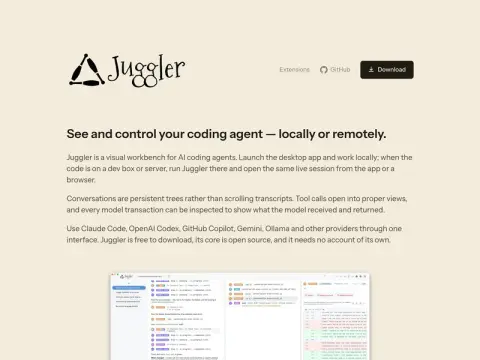
Juggler has created a user-friendly desktop interface for AI-coded proxies. Its key premise is that using coded proxies requires the processing of large amounts of text, and scrollable chat logs are not suitable for such tasks.

Therefore, it represents the dialogue in the form of a tree structure, rather than a log. Any point within this structure can be used as a branching point, and recursion is also possible – for example, a new thread can be created to attempt another approach or execute a delegated task. Ultimately, only the results are returned to the parent thread, ensuring that the intermediate processes do not interfere with the main context. The navigation system uses the Miller-style multi-column view commonly found in the Finder; tool calls, properties, and nested threads are all displayed in a flat, expandable format.

Debugging capabilities represent another key aspect of its design: Tool parameters, approval processes, and response results are all presented through separate user interfaces. Whenever a model request is initiated, users can view the system notifications received, relevant messages, tool definitions, as well as output data, token usage statistics, execution time, and reasons for any interruptions that may occur during the process.

Flexible running options: You can simply launch the desktop application if you want to use it locally. If you are developing on a development machine or server, Juggler will run there automatically. You can then connect to it from either the desktop or a browser via the same session, which is stored on your disk. The session will not be lost even if you exit and reconnect later. Juggler supports multiple code assistance tools such as Claude Code, Codex, GitHub Copilot, Gemini, and Ollama. It is available for free download, and its core functionality is open-sourced – you don’t need to register an account to use it.

Visits:164 Updated:2026-11-24 Popular tools

Related

Listen 1 Music Player Listen 1 Music Player: “Listen 1” is an open-source music aggregation, search, and playback tool. It supports platforms such as NetEase Cloud Music, QQ Music, KuGou, Bilibili, Migu, and Qianqian. In other words, you only need to download the Listen 1 software in order to listen to music from these seven platforms. Libraries S2 Libraries S2 is a paper visualization and exploration tool similar to Connected Paper. It uses visual interfaces to assist students, researchers, and scientists in finding and exploring papers related to their areas of work. Compared to Connect, this website offers several additional advantages… lrepacks lrepacks is a cracked software release site from Russia. Many of the Russian expert-cracked software versions we find online come from this site. All cracked software on lrepacks consists of repackaged versions—each version is packaged once, which means we need to update. Edraw MindMap Edraw MindMap, a professional Chinese-developed mind mapping software that combines visual appeal with substance, supports 22 different mind map layouts and offers a high degree of customization to help you organize your knowledge and ideas! The September update to AI Assistant 3.0 is designed to unleash your creative productivity. Four key highlights of Edraw MindMap Assistant 3.0: McSounds McSounds is a super minimal free sound effects download site with no category options—just two sections: Search and Try Your Luck. Try Your Luck gives you a random sound effect. If you need a sound effect, just search for it in Chinese. The site has no ads and requires no registration or login. Developer Search Developer Search is a vertical search engine launched by Baidu for developers. Let me sigh first, if Baidu Search could be so easy to use, how could it be where it is today??? Baidu Developer Search can be described as small and beautiful. The homepage is composed of five major modules, namely, search, popular information, g